
Stop Choosing Between Good Design and Good SEO: The Framer Optimization Guide
Learn how to set up your headers, configure your CMS data, clear technical gates, and pass Google's Core Web Vitals without losing your creative freedom.

Shah Rukh
Learn how to set up your headers, configure your CMS data, clear technical gates, and pass Google's Core Web Vitals without losing your creative freedom.
For a long time, the web design world shared a frustrating, unwritten rule: if you wanted a jaw-dropping, animation-heavy website, you had to sacrifice your Google rankings. Heavy scripts, messy code exports, and slow loading times meant beautiful sites often rotted on page ten of the search results.
Then Framer changed the game.
Because Framer compiles your designs into ultra-fast, pre-rendered static HTML, you get the visual freedom of a canvas with the lightning-fast performance Google demands. But just because Framer gives you an elite baseline out of the box doesn’t mean your site will magically rank #1. You still need to configure the details correctly.
If you want your Framer site to climb the search engine results pages (SERPs), this five-step optimization guide will help you lock down your rankings.
1. Structure Your Text for Crawlers (Not Just Humans)
Search engines don't look at your custom fonts or gorgeous layouts; they read the Document Object Model (the DOM). If your heading hierarchy is broken, Google won't understand what your page is about.
The Golden Rule of H1s: Every single page must have exactly one H1 tag. This should contain your primary keyword. If you accidentally set multiple text styles to H1 just because you liked the font size, you are confusing search crawlers.
The Breakdown: Use H2 tags for your main sections, H3 tags for sub-points inside those sections, and P tags for your regular paragraph copy.
How to fix it in Framer: Select any text element, look at the right-hand panel under Text styles, and manually assign the correct HTML tag.
2. Leverage Framer CMS for Content Scalability
A pretty landing page with two lines of copy will rarely rank for competitive terms. Google rewards active websites that consistently publish valuable content. The fastest way to build topical authority is through a blog or resource hub powered by the Framer CMS.
Dynamic Metadata: You don’t need to manually type SEO titles for every single blog post. In your CMS page settings, you can map your Meta Title and Meta Description directly to your CMS fields using variables like
{{Title}}and{{Excerpt}}. Framer will automatically generate unique, perfectly formatted metadata every time you hit publish.Clean Slugs: Ensure your CMS collection URL structure uses hyphens instead of underscores (e.g.,
/blog/framer-seo-tipsinstead of/blog/framer_seo_tips), which aligns directly with Google’s URL best practices.
3. Don't Skip Image Alt Text and Asset Optimization
Framer does an incredible job automatically converting your uploaded images into modern, web-friendly formats like WebP and serving them via a global CDN. However, it cannot write descriptions for you.
Write Descriptive Alt Text: Select an image, head to the right panel, and locate the alt text field. Do not stuff it with keywords. Instead, describe exactly what is in the image. For example, instead of "SaaS template design," use "Mockup of a dark-mode SaaS analytics dashboard running on a laptop."
Video Posters: If you embed video backgrounds or loop clips, always set a Poster Image (thumbnail) in the component settings. This gives search engines a clean image preview to index.
4. Master Your Site Settings & Technical Gates
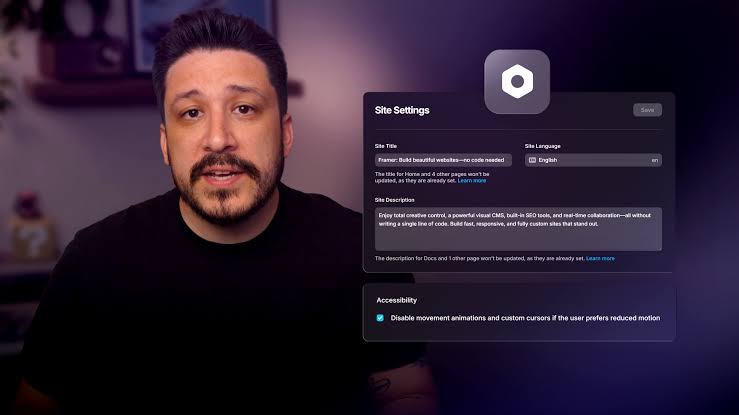
Framer automatically generates your sitemap.xml and robots.txt files on your custom domain, ensuring search engines can discover your new content instantly. However, you need to verify ownership to track your progress.
Google Search Console: Copy your HTML verification tag from Search Console, head to your Framer Site Settings → Custom Code, and paste it into the
<head>section. This lets you track exactly what search queries are driving traffic to your template or landing page.Manage Your 301 Redirects: If you are migrating an old website over to Framer or changing a page slug, never let the old link break into a 404 error. Framer has a built-in Redirects panel in the settings. Simply type the old path and point it to the new one to pass 100% of your existing ranking power right over to your new design.
5. Pass Google’s Core Web Vitals with Clean Canvas Habits
Framer sites are capable of scoring a perfect 100 on Google PageSpeed Insights, but bad design habits can drag your performance scores down. To ensure top-tier loading speeds, keep these rules in mind:
Limit Third-Party Scripts: Every live chat widget, tracking pixel, or complex third-party form embed you paste into your site code delays the browser's "Interaction to Next Paint" score. Only use scripts that are completely necessary.
Keep the Hero Section Lean: Avoid placing massive, multi-megabyte raw background videos or heavy 3D canvases right at the top of the page on mobile devices. Keep the immediate viewport light so the page renders instantly for mobile users.
The Pre-Publish SEO Checklist
Before you hit that publish button on your next Framer project, run through this quick baseline audit to ensure everything is structurally sound:
First, make sure your Heading Structure has only one H1 per page, followed by properly nested H2 and H3 tags. Next, check your Page Metadata to confirm you have written custom titles under 60 characters and descriptions under 160 characters for every single page. Ensure that all non-decorative Images have clear, descriptive alt text applied to them. Finally, verify that your Custom Domain is completely connected and fully verified inside Google Search Console.
By taking an extra ten minutes to align your design structure with these core principles, you ensure that your gorgeous Framer site gets the organic visibility and traffic it truly deserves.